You are not logged in.
- Topics: Active | Unanswered | Last 2 weeks
#1 2026-06-15 13:04
- eR@SeR
- Senior Member
- Registered: 2008-01-23
- Posts: 364
Pascal script rule is not updating new name in Analyze tool
When Pascal code rule uses 3rd party tool to get apk info like aapt2.exe, filename from New name column is not updated in "Text after applying rules" in Analyze tool.
Steps to reproduce:
1. Download aapt2.exe and update path in given script
2. Setup pattern that will change original name and add apk file
3. Click Analyze button from lower toolbar or double click on changed filename
Actual/expected result:
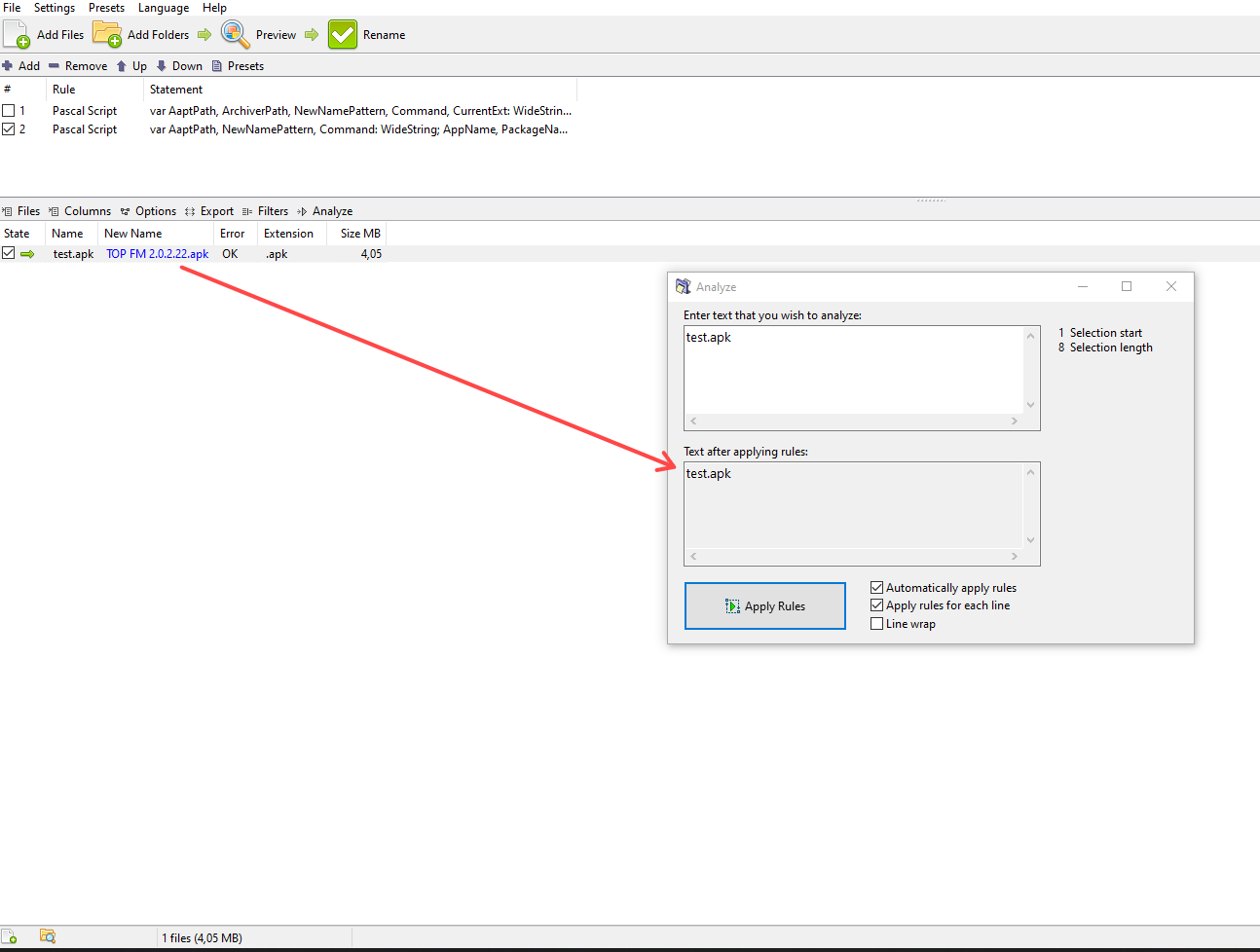
Analyze window is opened. However, text in "Text after applying rules" is not updated as per New name column (image above).
"Text after applying rules" should reflect state from New name column. Using any other Pascal rule like in given example below works fine.
var
  I, NumMatches, MatchLength: Integer;
  Positions: TIntegerArray;
  Matches: TWideStringArray;
begin
  NumMatches := FindRegEx(FileName, '.*', False, Positions, Matches);
  for I := NumMatches-1 downto 0 do
  begin
    Delete(FileName, Positions[I], Length(Matches[I]));
    Insert(WideCaseCapitalize(Matches[I]), FileName, Positions[I]);
  end;
end.
Another possible issue with Analyze tool is that Analyze button works as expected for all other rules. However, if button is used from Options/Analyze sample text, text is not updated.
Steps to reproduce:
1. Add 1 or more files and at least one rule that will change original filename
2. Select one, two or all files (Ctrl + A)
3. Click Options/Analyze sample text button or use Shift + A shortcut key
Actual/expected result:
"Text after applying rules" is not updated as per selected file(s). Behavior should be same as Analyze button, which works fine in this case.
I am not sure if this is intended behavior. IMO, it should behave like Analyze button since shortcut key can be used instead.
Offline