You are not logged in.
- Topics: Active | Unanswered | Last 2 weeks
Pages: 1
#1 2026-07-02 00:02
- fedefat
- Member
- Registered: 2026-07-01
- Posts: 4
network usage: chosen card not selected
I use a USB Wi‑Fi adapter on my mini PC. When I select “network usage” under Events, I end up with a huge list of network devices to choose from, and five of them refer to the USB Wi‑Fi adapter. But no matter which one I pick and confirm, it always switches to “Microsoft Wi‑Fi Direct Virtual Adapter #6”. Basically, I can’t manage to set a damn rule on network usage.
Is there a way to fix this?
Thank you.

https://www.pasteboard.co/rmfXPDkMRDta.png
https://www.pasteboard.co/BHcNZj17oKBK.png
Last edited by fedefat (2026-07-02 13:36)
Offline
#2 2026-07-02 16:40
- den4b
- Administrator

- From: den4b.com
- Registered: 2006-04-06
- Posts: 3,548
Re: network usage: chosen card not selected
Shutter uses the device MAC address to uniquely identify a network interface.
It might be the case that your device's MAC address is not static, i.e. changes dynamically.
Let's do some troubleshooting:
1. Configure a Network Usage event.
2. Save it as a preset, e.g. "Test".
3. Open the preset file with a Notepad.
4. Identify the configured MAC address in the event configuration.
You should find something like this:
[Event1]
ID=NetworkUsage
Config=INTERFACE=00-00-00-00-00-00;...
Where "00-00-00-00-00-00" is a placeholder for your device's MAC address.
You can also use command prompt to list all network devices and their MAC address (also known as "Physical Address"):
ipconfig /allExperiment. Check if the MAC address changes.
Offline
#3 2026-07-02 21:58
- fedefat
- Member
- Registered: 2026-07-01
- Posts: 4
Re: network usage: chosen card not selected
Thank you for your reply.
I ran two tests. The first one is the one you described. In the other one, I edited my current profile config file and inserted the MAC address of the Wi‑Fi adapter.
In both cases, the result doesn’t change: the MAC address always stays the same, even if the device is always displayed as "Microsoft Wi‑Fi Direct Virtual Adapter #6". But the traffic on that adapter always shows zero. Why that happens, I really can’t say.
Last edited by fedefat (2026-07-03 14:49)
Offline
#4 2026-07-05 23:19
- den4b
- Administrator
- From: den4b.com
- Registered: 2006-04-06
- Posts: 3,548
Re: network usage: chosen card not selected
In the screenshots I can see that the selected network device does not have an assigned IP address, which is indicated by the empty square brackets "[]" before the device name. If the device does not have an IP address, it can't have any IP traffic.
Do you see any devices that have an IP address assigned?
Does "ipconfig /all" command show an IP address for that same device?
Offline
#5 2026-07-06 08:55
- fedefat
- Member
- Registered: 2026-07-01
- Posts: 4
Re: network usage: chosen card not selected
Maybe the empty square brackets were due to the fact that I had disconnected the USB board at that moment.
Anyway, yes, an IP address is associated with that entry, as shown in the screenshot.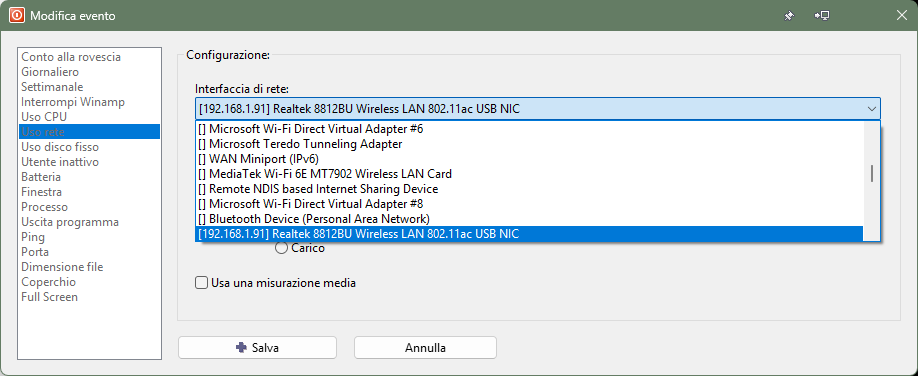
https://ibb.co/pvPSr0Cq
And yes,
ipconfig /allalso shows an IP.
Scheda LAN wireless Wi-Fi 3:

   Suffisso DNS specifico per connessione: lan
   Descrizione . . . . . . . . . . . . . : Realtek 8812BU Wireless LAN 802.11ac USB NIC
   Indirizzo fisico. . . . . . . . . . . : xx-xx-xx-xx-xx-xx
   [cut]
   Indirizzo IPv4. . . . . . . . . . . . : 192.168.1.91(Preferenziale)
   Subnet mask . . . . . . . . . . . . . : 255.255.255.0
   [cut]
Last edited by fedefat (2026-07-06 08:56)
Offline
#6 Today 15:55
- den4b
- Administrator
- From: den4b.com
- Registered: 2006-04-06
- Posts: 3,548
Re: network usage: chosen card not selected
Thank you for the details.
There is a possibility that the order of network devices gets altered after Shutter begins monitoring a specific device index, which is inferred from the target MAC address when the event starts.
Do you perform any device related changes? Add/remove/disable/enable devices?
This is just a quick update. We'll continue to assess the implementation for potential causes for such behavior.
Offline
#7 Today 17:36
- fedefat
- Member
- Registered: 2026-07-01
- Posts: 4
Re: network usage: chosen card not selected
Thank you for the details.
There is a possibility that the order of network devices gets altered after Shutter begins monitoring a specific device index, which is inferred from the target MAC address when the event starts.
Do you perform any device related changes? Add/remove/disable/enable devices?
Maybe it happened a few times, but I generally don’t add/remove my network adapters.
In any case, I restarted the PC with only the USB Wi‑Fi adapter enabled, and nothing changed.
Offline
Pages: 1