You are not logged in.
- Topics: Active | Unanswered | Last 2 weeks
#1 2026-06-15 13:04
- eR@SeR
- Senior Member
- Registered: 2008-01-23
- Posts: 364
Pascal script rule is not updating new name in Analyze tool
When Pascal code rule uses 3rd party tool to get apk info like aapt2.exe, filename from New name column is not updated in "Text after applying rules" in Analyze tool.
Steps to reproduce:
1. Download aapt2.exe and update path in given script
2. Setup pattern that will change original name and add apk file
3. Click Analyze button from lower toolbar or double click on changed filename
Actual/expected result:
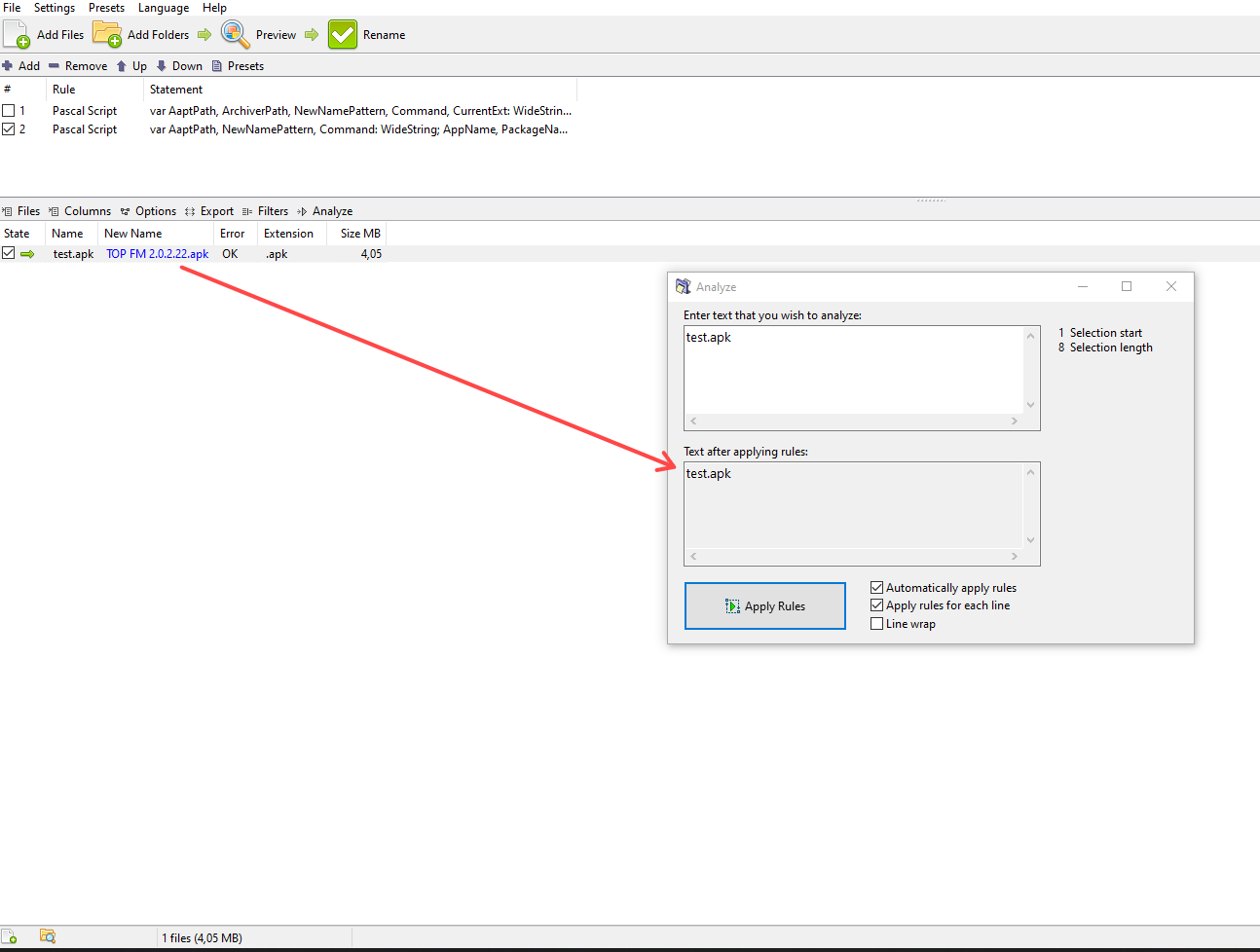
Analyze window is opened. However, text in "Text after applying rules" is not updated as per New name column (image above).
"Text after applying rules" should reflect state from New name column. Using any other Pascal rule like in given example below works fine.
var
  I, NumMatches, MatchLength: Integer;
  Positions: TIntegerArray;
  Matches: TWideStringArray;
begin
  NumMatches := FindRegEx(FileName, '.*', False, Positions, Matches);
  for I := NumMatches-1 downto 0 do
  begin
    Delete(FileName, Positions[I], Length(Matches[I]));
    Insert(WideCaseCapitalize(Matches[I]), FileName, Positions[I]);
  end;
end.
Another possible issue with Analyze tool is that Analyze button works as expected for all other rules. However, if button is used from Options/Analyze sample text, text is not updated.
Steps to reproduce:
1. Add 1 or more files and at least one rule that will change original filename
2. Select one, two or all files (Ctrl + A)
3. Click Options/Analyze sample text button or use Shift + A shortcut key
Actual/expected result:
"Text after applying rules" is not updated as per selected file(s). Behavior should be same as Analyze button, which works fine in this case.
I am not sure if this is intended behavior. IMO, it should behave like Analyze button since shortcut key can be used instead.
Offline
#2 Yesterday 12:04
- den4b
- Administrator

- From: den4b.com
- Registered: 2006-04-06
- Posts: 3,564
Re: Pascal script rule is not updating new name in Analyze tool
Two different things are getting mixed here.
Analyze vs New Name column
The Analyze dialog works on plain text only. It has no file behind it, so FilePath is empty when the Pascal Script runs there. Your APK script that calls the aapt2 tool requires a valid FilePath. That's why you only see it working in the New Name column.
Analyze Name vs Analyze sample text
These are not the same command.
Analyze (toolbar) and Analyze Name (files context menu) load the selected names into the dialog, then apply the rules.
Analyze sample text (Shift+A, Options menu) only opens the dialog. It does not load the selection and does not clear what is already there.
The next version will have slight adjustments to the shortcuts, and hopefully this will help resolve or avoid the confusion.
Analyze Name will be a prominent default action on the files table, triggered by the Enter key and double-click.
See also the updated documentation: https://www.den4b.com/docs/books/rename … alyze-tool
Offline