You are not logged in.
- Topics: Active | Unanswered | Last 2 weeks
#1 2026-06-11 16:10
- toad01
- Member
- Registered: 2026-05-08
- Posts: 9
List capacity is insufficient
What does it mean?!
I regularly get this warning popping up every few days. I just click OK and 'risk data corruption' and all appears ok. I also very occasionally get an 'Access violation' warning that I similarly ignore. It would be nice know what is causing these warnings and how to stop them. Despite this, Shutter is by far the most reliable and sophisticated software I have used for sending my PC to sleep.
Thank you.
Offline
#2 2026-06-12 08:48
- den4b
- Administrator

- From: den4b.com
- Registered: 2006-04-06
- Posts: 3,567
Re: List capacity is insufficient
Thank you for your feedback.
Can you reproduce this issue with the latest version (4.8 or 4.8.0.1 Beta)?
If you can, please describe your setup and the steps to reproduce.
Offline
#3 2026-06-12 10:14
- toad01
- Member
- Registered: 2026-05-08
- Posts: 9
Re: List capacity is insufficient
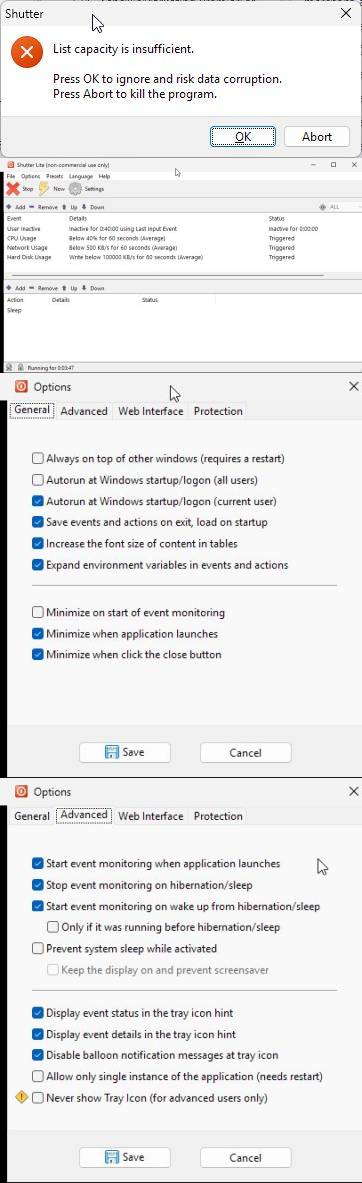
I have been using version 4.8 since it was launched. Running Windows 11 Pro. Here are screenshots of the error and the settings I'm using:
Offline
#4 2026-06-12 23:40
- den4b
- Administrator
- From: den4b.com
- Registered: 2006-04-06
- Posts: 3,567
Re: List capacity is insufficient
Thank you for the screenshots.
We couldn't reproduce the issue, but the error message together with your events setup led us to discover a potential race condition which can result in a "List capacity is insufficient" error. Safe guards have been put in place in v4.8.0.2 Beta to prevent this race condition.
Please try the latest development version, and let us know if you experience any errors again.
Offline
#5 2026-06-13 08:56
- toad01
- Member
- Registered: 2026-05-08
- Posts: 9
Re: List capacity is insufficient
Wow, impressively quick response! Thank you.
I am now using v4.8.0.2 Beta and will let you know how it goes.
Offline
#6 2026-06-19 07:43
- toad01
- Member
- Registered: 2026-05-08
- Posts: 9
Re: List capacity is insufficient
I thought this had fixed it, but this morning it popped up again having resumed the PC from sleep overnight. It may have reduced the frequency of it though.
Offline
#7 2026-07-08 09:14
- toad01
- Member
- Registered: 2026-05-08
- Posts: 9
Re: List capacity is insufficient
I've had no further issues since 19/6, so this version has significantly reduced the problem. Thank you.
Offline
#8 2026-07-08 14:08
- den4b
- Administrator
- From: den4b.com
- Registered: 2006-04-06
- Posts: 3,567
Re: List capacity is insufficient
I've had no further issues since 19/6, so this version has significantly reduced the problem. Thank you.
Thank you for the update.
Unfortunately we are still unable to reproduce this issue locally, which makes it difficult to troubleshoot further.
However, you can use a special Shutter 4.8.0.2 debug build to capture crucial debugging information.
If an error occurs, you should see a message with detailed stack trace, which should also get logged in "Error.log" file in the application data folder. If you manage to capture these details, this will be extremely helpful for finding the root cause.
Offline
#9 2026-07-10 08:20
- toad01
- Member
- Registered: 2026-05-08
- Posts: 9
Re: List capacity is insufficient
I've just tried using the debug version and it crashes and exists after a couple of seconds! I've attached the error log.
Offline
#10 2026-07-12 23:30
- den4b
- Administrator
- From: den4b.com
- Registered: 2006-04-06
- Posts: 3,567
Re: List capacity is insufficient
I've just tried using the debug version and it crashes and exists after a couple of seconds! I've attached the error log.
Thank you for providing the error log.
Can you describe the steps please?
Did you just start the events monitoring and it crashed within a couple of seconds?
Did you perform any other actions while it was running?
Offline