You are not logged in.
- Topics: Active | Unanswered | Last 2 weeks
#1 Today 10:23
- 3xploiton3
- Member
- Registered: 2026-02-09
- Posts: 1
ReNamer 7.10 Pro on Wine 11.0: black button captions
Hello,
I am encountering unreadable button captions in ReNamer 7.10 Pro running under Wine.
Environment:
- Debian GNU/Linux 13 (trixie), amd64, KDE Plasma
- WineHQ stable 11.0 (11.0.0.0~trixie-1)
- ReNamer 7.10 Pro, dedicated Wine prefix, default Wine light theme
Steps / observed behavior:
1. Launch ReNamer.
2. Open Filter Settings.
3. The bottom buttons have missing/unreadable captions. A solid black rectangle is visible inside the right-hand button, while most other dialog text and checkboxes remain readable.
Expected: readable button captions and icons.
A workaround was attempted by launching with WINEDLLOVERRIDES="uxtheme=d" (disabling Wine visual styles for this application). Subsequently, ReNamer displayed:
"External exception 80000100."
"Press OK to ignore and risk data corruption. Press Abort to kill the program."
The exact action triggering that exception has not been established, so I cannot confirm that the override caused it. The override has now been removed and the original launcher restored. This exception is additional context, separate from the original button rendering issue.
Could this relate to the recently introduced theme support? Is there a supported workaround for Wine, or any diagnostic information you would like me to collect? Screenshots of the button rendering issue are attached below.
Thank you.
Screenshot 1: Settings (Theme: Auto)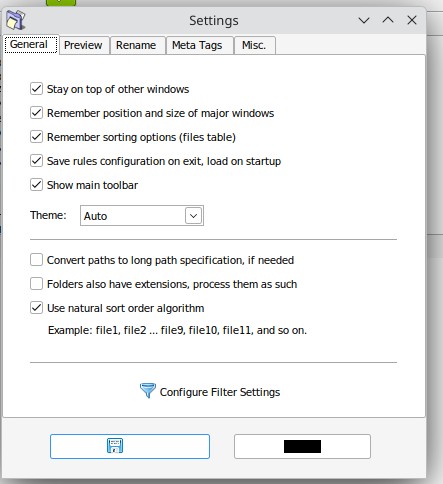
Screenshot 2: Filter Settings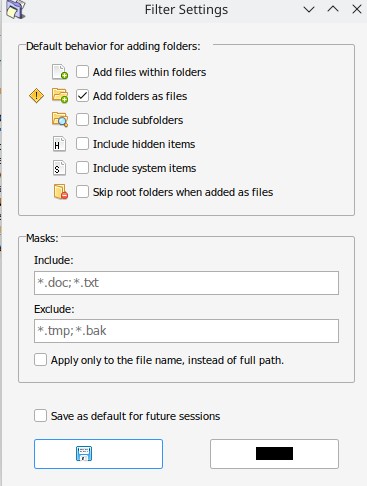
Last edited by 3xploiton3 (Today 10:32)
Offline
#2 Today 14:18
- den4b
- Administrator

- From: den4b.com
- Registered: 2006-04-06
- Posts: 3,570
Re: ReNamer 7.10 Pro on Wine 11.0: black button captions
Thank you for a detailed report.
Can you please try a few older versions of ReNamer to see if you get the same behavior?
The theming component is activated only when the dark mode is activated, otherwise it should not impact the default render.
On a related note, would you be interested in trying a native built for Linux? It should be ready for public testing very soon.
Offline