
Hash Text
The Hash Text dialog computes hash values for an arbitrary text string rather than a file. This is useful for verifying that a piece of text has not changed, matching a hash published alongside a text snippet, or testing how a particular algorithm behaves.
Open it via File » Hash Text from the main menu or via the main toolbar.
TODO: Insert screenshot here.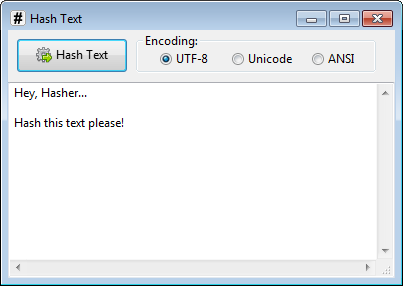
Type or paste the text you want to hash into the input area, then click Hash Text. The results appear in the main window in the same way as for a hashed file, with a value shown for each enabled algorithm.
Encoding
Before hashing, Hasher encodes the text into bytes according to the selected encoding. Because the same string can produce different byte sequences under different encodings, the choice of encoding directly affects the resulting hash values.
Three encodings are available:
- UTF-8 — the default and most widely used encoding. Suitable for most purposes and the best choice when in doubt.
- Unicode — encodes the text as UTF-16 little-endian, as used internally by Windows.
- ANSI — encodes the text using the system default code page. Results may vary between machines with different regional settings.
When matching a hash from an external source, use the same encoding that was used to produce it. If the encoding is not specified, UTF-8 is the most common assumption.