
Generating passwords
RandPass supports two password generation mechanisms, each suited to different needs. The Characters tab builds passwords by drawing from a configurable pool of individual characters. The Words tab assembles passphrases from randomly selected words — an approach that tends to produce results that are easier to remember.
The Number of passwords field and the Generate passwords button at the bottom of the window are shared between both tabs. Set the count before generating, then switch tabs to change the active mechanism. The result includes a password strength rating for the options in use.
Character-based passwords
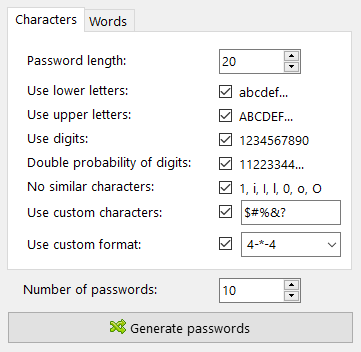
The Characters tab constructs each password by randomly sampling from the enabled character groups. The options below control which characters are eligible and how the password is structured.
Password length
Set the total number of characters in each generated password.
Use lower letters
Include lowercase letters (abcdef…) in the character pool.
Use upper letters
Include uppercase letters (ABCDEF…) in the character pool.
Use digits
Include decimal digits (1234567890) in the character pool.
Double probability of digits
Weight the pool so that digits are drawn roughly twice as often as other characters (11223344…). Useful when a minimum digit count is required by a policy or website.
No similar characters
Exclude characters that are visually ambiguous and easy to confuse when reading or typing: 1, i, I, l, 0, o, O. Enable this option when a generated password may need to be transcribed manually.
Use custom characters
Extend the pool with additional characters entered in the accompanying field. These are added alongside whichever standard groups are enabled. Use this to include characters that none of the standard groups cover, or to define a fully custom set by enabling only this option.
Use custom format
Apply a structural pattern to each generated password instead of a purely random sequence. The pattern string is interpreted as follows:
- A decimal number draws that many characters from the generated pool, e.g.
4places four random characters. *is a dynamic-length placeholder that draws all characters not already consumed by numeric placeholders. Multiple*placeholders split the remaining characters evenly, e.g.2-*-*-2.- Any other character passes through unchanged as a literal, allowing fixed separators or structural markers, e.g.
{8-4-4-4-12}produces a GUID-like format.
The dropdown offers several predefined patterns to choose from.
Word-based passwords
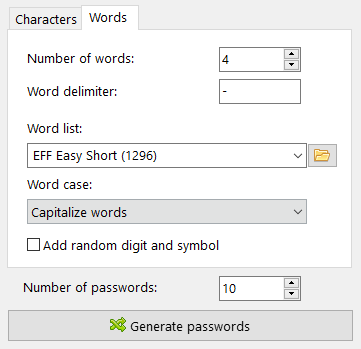
The Words tab generates passphrases by combining randomly selected words, separated by a configurable delimiter. Word-based passphrases derive their strength from the number of possible word combinations rather than character complexity, making them well suited to situations where a password must also be memorized.
Number of words
Set how many words to include in each passphrase. Five or six words from a large list produce a strong password.
Word delimiter
Specify the character or string placed between words. Leave the field empty to join words without any separator.
Word list
Select the word list used for generation from the dropdown. Several common word lists are bundled with the application.
Larger word lists increase the total number of possible combinations for a given word count, which improves strength.
A custom word list file can be loaded using the folder button beside the dropdown. See word lists for the technical specification.
Word case
Control how the capitalization of each selected word is adjusted. Available options: Original, Lower case, Upper case, Capitalize words, Random case per word.
Add random digit and symbol
Insert a randomly chosen digit and symbol into the passphrase. Enable this when a minimum complexity requirement must be satisfied alongside the word-based structure.