
Analyze tool
TODO: Proof read, update links.
When you select theThe Analyze tool option (or press Shift+A), ReNamer launchesopens a window,window where you can enter any arbitrary text and applytest your current rules enteredagainst it, without renaming any actual files. Open it from the Files and Tools toolbar or press Shift+A in the Rulesmain pane.window.
The input text can be typed manually or loaded from file names already in the Files pane. Rules from the Rules pane are applied to the input and the result is displayed alongside it. This is veryparticularly useful to see the effect of the rules using dummy text (for exampleverifying rule behaviour before usingcommitting theto a rename — for example, when setting up an Insert rule). It also allows to checkconfirm the positionsexact ofinsertion anyposition.
The input text may be a file name (or multiple file names) loaded from Files pane, or any text manually entered by user - which can be very useful when you want to apply renaming rules to a piece of arbitrary text.right.
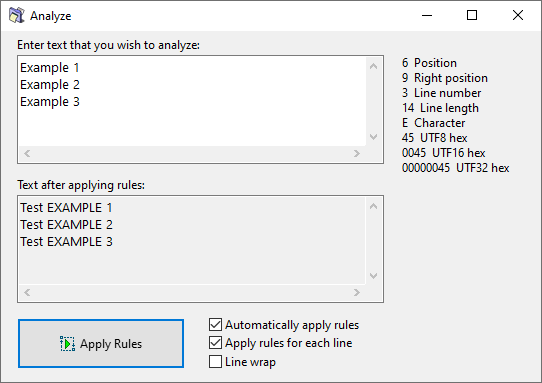
The available options in the window are as follows:are:
| Option | Description |
|---|---|
| Automatically apply rules | Apply rules |
| Apply rules for each line | |
| Line wrap |
Note: AUsing combination of Line wrap andtogether with Apply rules for each line options maycan produce anunexpected undesiredresults. effectLine duewrapping tointroduces the way how theartificial line wrappingbreaks, works.and Rulesrules will be applied to each line separately, even toof those createdwrapped artificiallyfragments as aif resultthey ofwere lineseparate wrapping.lines.