
Analyze tool
The Analyze tool opens a window where you can enter arbitrary text and test your current rules against it, without renaming any actual files. Open it from the Files and Tools toolbar or press Shift+A in the main window.
The input text can be typed manually or loaded from file names already in the Files pane.pane using the Analyze Name option in the Files context menu. Rules from the Rules pane are applied to the input and the result is displayed alongside it. This is particularly useful for verifying rule behaviour before committing to a rename — for example, when setting up an Insert rule to confirm the exact insertion position.
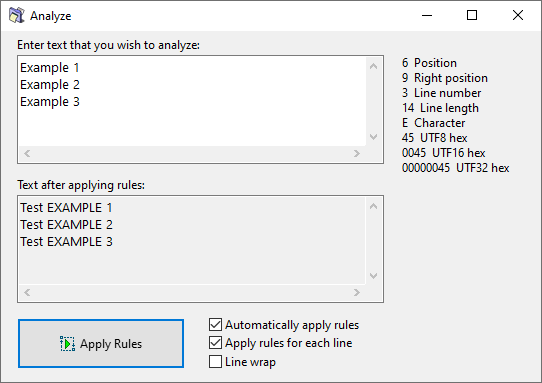
The available options are:
| Option | Description |
|---|---|
| Automatically apply rules | Apply rules whenever the input text changes, so you do not need to press the Apply Rules button after each edit. |
| Apply rules for each line | Apply the rules to each line individually rather than to the whole text at once. |
| Line wrap | Wrap long lines to fit within the width of the input field. |
Note: Using Line wrap together with Apply rules for each line can produce unexpected results. Line wrapping introduces artificial line breaks, and rules will be applied to each of those wrapped fragments as if they were separate lines.