
Clean Up rule
TODO: Complete, review, update links.
This rule cleans up the filenames from (or for) commonly used naming conventions for Internet, peer-to-peer networks, and other applications. Multiple issues can be resolved at once.
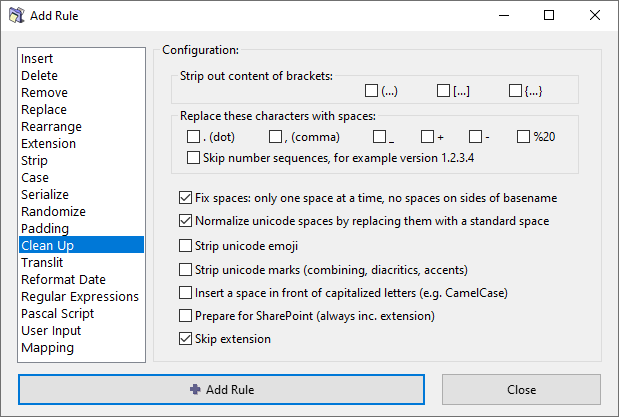
Options
Strip out content of brackets
Remove the content of various brackets, including the brackets.
You can choose the types of brakcets:brackets: (…), […], {…}.
A typical use of this option is to remove the needless comments attached to filenames.
Replace these characters with spaces
Replace various characters that are often used in place of spaces, such as . (dot), _ (underscore), and others.
Optionaly,Optionally, skip number sequences which may denontedenote versions numbers or phone numbers, for example "1.2.3.4".
Fix spaces
Replace multiple consecutive spaces with a single space character.
It also removes spaces from the beginning and the end of the filename. If the skip extension option is enabled, removes spaces around the base name (before the extension).
Normalize unicode spaces
Replace all Unicode white space characters with a standard space bar character code.
Unicode character set contains a number of different characters (C1_SPACE type) that represent a white space with slightly different properties (e.g. wider, narrower, non-breaking, etc).
Strip unicode emoji
Strip all Emoji code points from the filename.
For example, "Happy😀Face.mp3" becomes "HappyFace.mp3".
Strip unicode marks
Strip unicode marks, including combining marks, diacritics and accents.
For example, it will convert "á" to "a", "Ñ" to "N", "X̅" to "X", and so on.
Insert a space in front of capitalized letters
Sometimes words in a filename are joined together without spaces or underscores, with each new word starting with a capital letter to improve readability. This naming pattern is also known as CamelCase.
This option separates such words by inserting a space before each capital letter (except the first character, to avoid a leading space).
For example, "SeparateTheseWords.pdf" becomes "Separate These Words.pdf".
Prepare for SharePoint
Prepares the filename for hosting it on Microsoft SharePoint.
{} with round brackets ()./\*?"<>|:
Special characters forbidden in SharePoint: #%~&
Skip extension
If checked, the file extension will be excluded from processing and will remain unaffected.