
Export menu
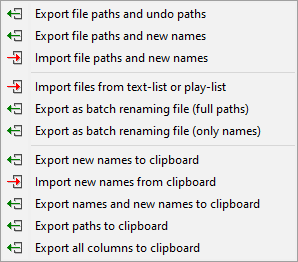
| Option | Description |
|---|---|
| Export file paths and undo paths | Exports file paths and undo paths to a CSV (comma separated) or TXT (tab separated) file. The undo paths are a result of a |
| Export file paths and new names | Exports file paths and new names to a CSV (comma separated) or TXT (tab separated) file. This may be |
| Import file paths and new names | Imports file paths and new names from a CSV (comma separated) or a TXT (tab separated) file. The importing feature supports both absolute and relative paths, which will get resolved relative to the path of the file being imported. |
| Import files from text-list or play-list | Imports file paths from a list file (one file per line) or a playlist file (M3U/PLS format). The importing feature supports both absolute and relative paths, which will get resolved relative to the path of the file being imported. Note that only those files which actually exist in the file system will be loaded into the Files table. |
| Export as batch renaming file | Generate a BAT/CMD script containing commands for executing the renaming of files. This script can be |
| Export new names to clipboard | Export new names to clipboard. One name per line. This may be |
| Import new names from clipboard | Imports new names from clipboard. Every name should be placed in a new line. If there are fewer lines in the clipboard text than the number of files in table, the excess files will have an empty new name. If there are more lines in the clipboard text than the number of files in table, the excess lines will be discarded. |
| Export names and new names to clipboard | Export original names and new names to clipboard. One pair of names per line, with names |
| Export paths to clipboard | Export original file paths of all files to clipboard. One path per line. |
| Export all columns to clipboard | Exports the content of the Files table (visible columns only) to clipboard, with values |