
Reformat Date rule
TODO: Update links.
This rule allows finding and reformatting various date/time values in the filename, including the ability to adjust date and time components.
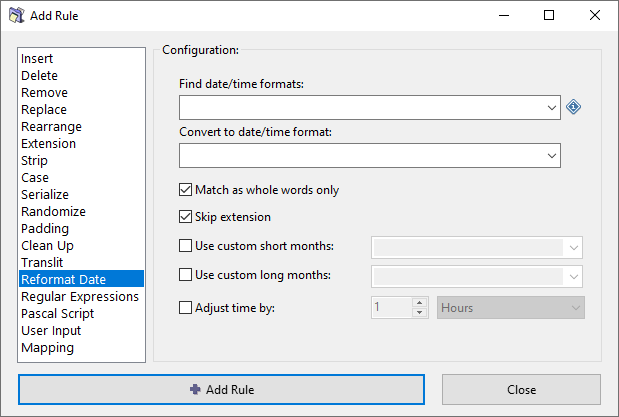
Options
Find date/time formats
Find date and/or time matching a specified format. A dropdown menu provides a quick access to commonly used formats.
Supported date/time format variables are described in the Date and Time format article. For example, "yyyy-mm-dd hh:nn:ss" format works for "2025-12-31 20:55:00".
You can specify multiple date/time formats in a single rule, separating them with | (vertical pipe). Alternatively, you can click the button menu located on the right side of the dropdown field.
Convert to date/time format
Convert found date and/or time values to the specified format. A dropdown menu provides a quick access to commonly used formats.
Match as whole words only
When searching for a matching date/time pattern, match only if the found pattern is a whole word, i.e. surrounded by word boundaries.
For example, the 4 digit year pattern (YYYY) will be found in "foo2025bar" if this option is disabled, but not found if this option is enabled.
Skip extension
Exclude the file extension from processing.
Use custom short months
Use a custom list of short month names when searching or formatting the short month name pattern (MMM). Month names are separated by a comma. By default, month names associated with your system locale will be used.
Use custom long months
Use a custom list of long month names when searching or formatting the long month name pattern (MMMM). Month names are separated by a comma. By default, month names associated with your system locale will be used.
Adjust time by
This option lets you adjust date and time by the specified number of years, months, days, hours, minutes, seconds, and milliseconds.