
Regular Expressions rule
TODO: Update links.
This rule allows finding and replacing patterns, and performing sophisticated manipulations with filenames using Regular Expressions.
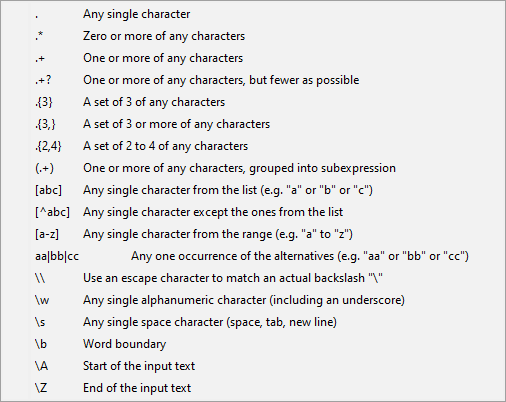
The Regular Expressions processor uses a special syntax for describing search and replace patterns, which are very powerful and well worth learning. If you are already familiar with them, please note that the syntax and features available in ReNamer are a little different from those in mainstream processors like Perl.
You can find many use cases and examples in the User Forum, where you might find your particular case already solved.
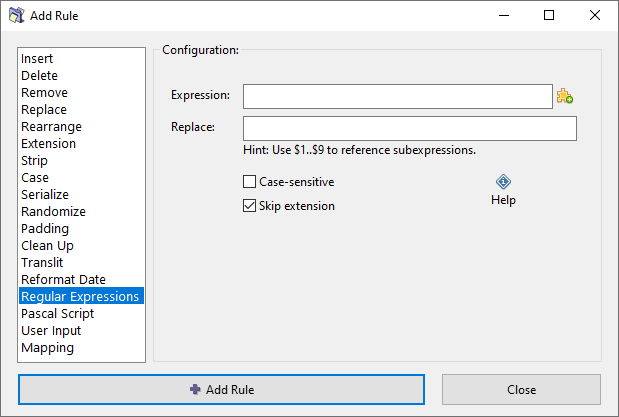
Options
Expression
The expression (pattern) you want to find.
Replace
The pattern that replaces the found expression.
Captured subexpressions (parenthesized groups in the pattern) can be referenced via short codes $1, $2, $3, and so on. The entire match is accessible via short code $0.
Case-sensitive
Match case exactly when searching for the expression. When enabled, "Apple" will not match "apple". When disabled, uppercase and lowercase letters are treated as equivalent.
Skip extension
If checked, the file extension will be excluded from processing and will remain unaffected.