Overview
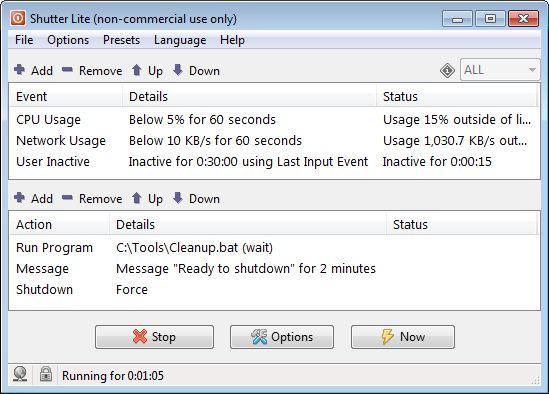
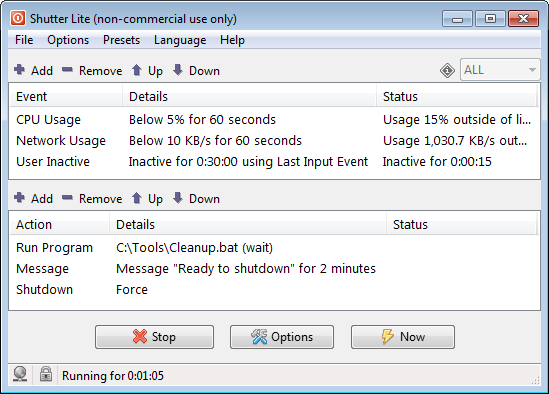
Shutter is a powerfulmultipurpose scheduling and flexible multifunctional schedulingautomation utility.
It
Despite its name, its use is not limited to just shutting downmonitors a programconfigurable orset of events and, when the PC.conditions Shutterare canmet, wait forexecutes one or more actions. Multiple events and thenactions can be combined and will execute in sequence.
Events cover a lotwide range of diversetriggers: actions,time-based suchcountdowns as:
and scheduled Launchtimes, specifiedresource application(s).thresholds Close(CPU, specifiednetwork, disk), application
window(s).and Killprocess specifiedstate, application(s)connectivity evenand ifport theymonitoring, arepower runningand inhardware systemconditions tray.(battery, Playlid, afull screen), file size changes, and custom
sound.program Displayoutput.
aActions messageinclude onpower screen.
management, Disconnectdisplay and audio control, notifications, screenshots, program and window control, and workflow management, including sequencing multiple presets for more complex automation scenarios.
Desktop shortcuts let you trigger any action directly without opening the dial-upapplication. modem.
The Log out from Windows account.
Lock the desktop or start a screensaver.
Shut down the PC, reboot, hibernate, sleep, etc.
Apart from a user-friendly and easy-to-use interface, Shutter also offers the following options:
You can create links on Desktop, to execute any of the supported actions directly from the desktop.
You can use Shutter'sbuilt-in Web Interface toenables remotelyremote executecontrol anyof action.the computer and displays live system information, including uptime, running processes, a desktop screenshot, and more.