
Extension rule
TODO: Update links.
This rule lets you change the file extension, with the option to automatically detect the appropriate extension based on the file's content.
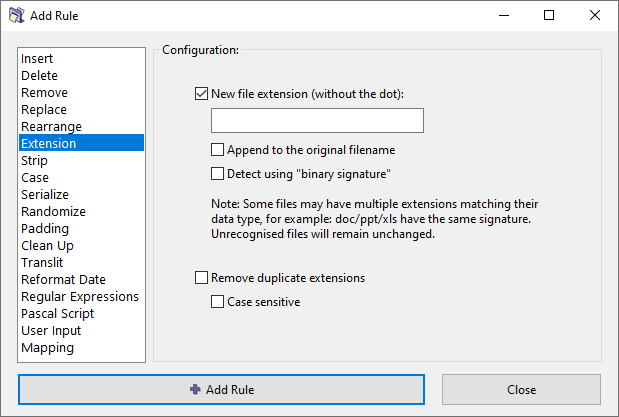
Options
New file extension
Specify the new file extension, without a leading dot. For example: txt, mp3, jpg.
Append to the original filename
Rather than changing the original file extension, appened the new extension to the end of the filename.
Detect using binary signature
Attempt to detect the appropriate file extension based on the file's content, using the so called binary signatures (see the section below).
Remove duplicate extensions
If a file has consecutive duplicate extensions, remove the duplication. For example: file.jpg.jpg becomes file.jpg.
Case sensitive
When removing duplicate extensions, extensions must match exactly to be considered duplicates. For example: .jpg.jpg will be corrected, but .jpg.JPG will not.
Binary signatures
Sometimes the extension of a file is missing. At other times it is simply wrong, e.g. some downloaded files get the aspx extension, although they may actually be zip or pdf files. One way to identify the file extension is by trial-and-error: Attach different extensions and try to open the file with its associated application. This is very tedious.
A far more efficient way is to compare the file's digital signature with the signatures of known file types to identify the correct file type. This is done internally within ReNamer, so you do not have to know what digital signature means, or the actual value of the signature for a given file.
Note that each extension has a range of signatures, and these ranges overlap. This means a given file's signature may match with the signature of several different extensions. In such cases, ReNamer shows the new filename with all matching extensions. For example, file.wma|wmv|asf. ReNamer also shows a warning message, because the combined extension is invalid. Just read the suggested extensions and try them out one by one. This method is still better compared to making wild guesses.
For more accurate results, use ReNamer with TrID library, a specialized utility for identifying the file's real extension. Be aware that even TrID tool often suggests multiple extensions, and you may still have to try them out.
Filename starts with a dot
Many operating systems treat the dot at the start of the filename as an indicator that the file should be hidden from the user. For that reason, the dot at the start of the filename is not considered as a file extension delimiter.
This behavior can be toggled via an option in the settings file:
FirstDotAtFileNameStartIsExtension=1
The settings file is normally located in the Application Data Storage.
Examples of filenames and their considered extension depending on the value of the option:
| Filename | Extension if 1 | Extension if 0 |
|---|---|---|
file.ext |
.ext |
.ext |
.file.ext |
.ext |
.ext |
.file |
.file |