Main settings
TODO: Proof read, update links.
This sectionpage describes the settings that changecontrol ReNamer's behaviour in various ways.
General settings
These settings control the general behaviour of the application.
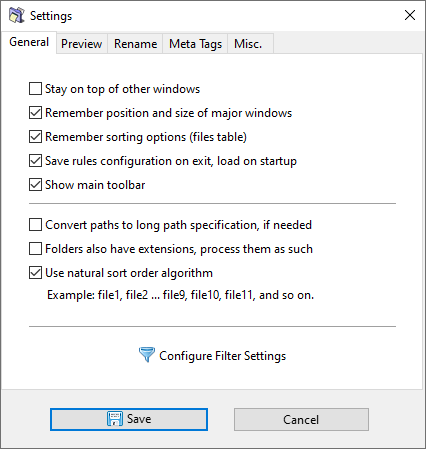
Option
Description
Stay on top of other windows
KeepsKeep the ReNamer window on top of other applications.
This
feature is useful when
youadding arefiles using thevia drag-and-drop
method to add files from Windows
Explorer.Explorer, When you are working in Windows Explorer,as the ReNamer window
doeswill not
vanishdisappear belowbehind the
Windows Explorer
window.window while you work.
Remember position and size of major windows
Retain the
same size and position
inof themajor nextwindows session.between Yousessions, willso they do not need to
resize/repositionbe the main windowsrepositioned each time
youReNamer start it.starts.
Remember sorting options (files table)
ReNamer will retainRetain the file sorting order
inbetween the next session.sessions.
Save rules configuration on exit, load on start up
Remember the currently loaded
rules/rules or preset on exit and
loadrestore themit automatically on the next
start up.
start.
As of
v7.2.0.6 Beta, the default preset is remembered by
the preset
name,name rather than
viaas an anonymous default preset, unless the preset was in
thea modified state at the time of saving.
Show main toolbar
This option allows you to hideShow the main
toolbar. When disabled, the toolbar
is hidden to gain extra space for
the rules and files tables.
You canAll stillactions usenormally available in the toolbar remain accessible via the main menu or
thekeyboard shortcuts to access the actions normally presented in the toolbar.shortcuts.
Convert paths to long path specification, if needed
Convert all added paths to
long path specification when the system does not support long paths natively.
This
will prefixprefixes paths with
\\?\, to increaseraising the maximum
allowed path length
enforecedenforced by Windows
operating system from 260 characters to 32,767 characters.
Folders also have extensions, process them as such
FileA file extension is
considereddefined to beas whatever follows the last dot in the filename. This setting controls
ifwhether thisthe same concept
also applies to folders, i.e.
whether folders can have an extension.
Prior to
v5.74.5 Beta, a dot in
the name of a folder
name was also
consideredtreated toas identifyidentifying an extension,
hence,so the
Skip Extension option in rules
also applied to
folders.folders as well. In newer versions
the extension in foldersthis is no longer
treatedthe ascase, such, however,but this
behaviorsetting canrestores bethe changedold with this setting.behaviour.
Use natural sort order algorithm
If this option isWhen enabled, filenames are sorted in
Natural order; otherwise they are sorted in
Lexicographical order. See
below the
description of sorting alogirthmsalgorithms section below for
more information.details.
Sorting algorithms
Two sorting algorithms Sortingare Exampleavailable Descriptionfor ordering files
in the files table.
Natural
Numbers embedded in filenames are sorted by their numeric value rather than character by character, which produces a more intuitive ordering:
Name1.ext
Name2.ext
Name3.ext
Name10.ext
Name20.ext
Lexicographical
NumbersFilenames are sorted as in theira naturaldictionary, order.
strictly by character Lexicographicalposition from left to right. This means numeric portions are sorted by digit, not by value:
Name1.ext
Name10.ext
Name2.ext
Name20.ext
Name3.ext
Sorts like in a dictionary. All entries are sorted based on character positions, counted from left.
Preview settings
These settings are applicable onlyapply to the previewing.preview operation.
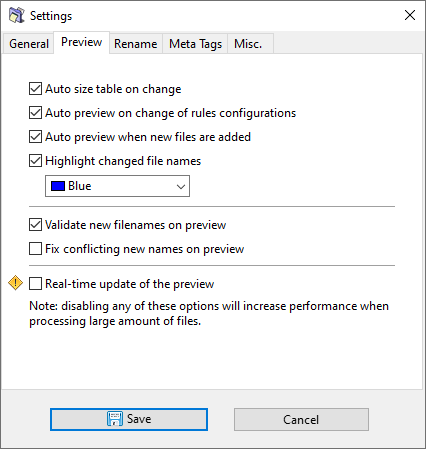
| Option |
Description |
| Autosize table on change |
EachAutomatically resize each column resizes automatically to accommodatefit the longest name init it.contains. |
| Auto preview on change of rules configurations |
WheneverRefresh the preview automatically whenever a rule is added/deleted/edited,added, theremoved, previewor refreshes automatically.edited. |
| Auto preview when new files are added |
WheneverRefresh the preview automatically whenever a file is added,added to the previewfiles refreshes automatically.table. |
| Highlight changed file names |
Highlight new names usingin thea specified colorcolour ifwhen they differ from the original names.
Thisnames, ismaking ait great wayeasy to visuallysee identifywhich files whichare get impactedaffected by the active renaming rules. |
| Validate new filenames on preview |
RaisesRaise a warning if any new filenames are not valid:valid. See ThereValidation arefor duplicatesdetails inon the New path column
New path contains forbidden characters
New pathwhat is already taken by an existing file
New path exceeds maximum allowed length
checked. |
| Fix conflicting new names on preview |
Resolve new name conflicts inautomatically newby appending a numeric suffix, producing names bysuch addingas a number suffix, like so: "Name (2)", "Name (3)", etc.and so on. This can also be triggered on demand via the Options menu. |
| Real-time update of the preview |
When this option is disabled (defaultthe setting)default), when you click theclicking Preview button,shows ReNamer does not show anyno progress until all files have been processed.
If this option isWhen enabled, when you click the Preview button, files will beare updated one-by-one by one to provide real-timelive visual feedback.
WARNING:Warning: ReNamer continues to accept usermouse inputsand (mouse/keyboard)keyboard input while processing in order to updatekeep the graphicalinterface user interface.responsive. Any interaction with the userUI interfaceduring while files are being processedprocessing may lead to unpredictable behavior.behaviour. Use this option with EXTREMEextreme CAUTION,caution, and only for cases when someheavy heavyper-file processing is doneinvolved, onsuch eachas file,hash foror example, using hash/checksum functionscalculations or other types of content analysis.
|
Rename settings
These settings are applicableapply to the renaming process.
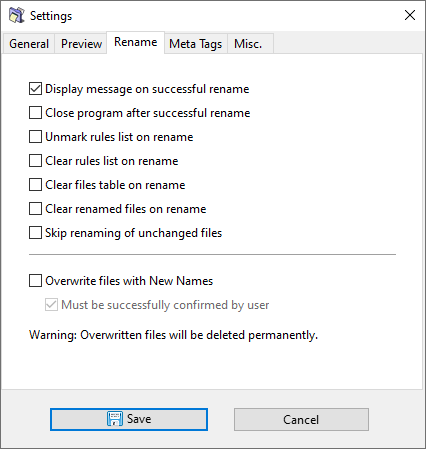
ReNamerThese canoptions boostlet youryou productivity by doingautomate certain operationsactions onthat itsfollow own.a Onrename theoperation, otheror hand,keep them manual if you mayprefer wantfull to have the flexibility of choosing your optionscontrol each time. So this panel lets you decide how to strike a balance.
| Option |
Description |
| Display message on successful rename |
DisableWhen ifdisabled, youno doconfirmation notmessage wantis shown after a messagesuccessful shown each time.
rename. This setting does not affect the error messages.
|
| Close program after successful rename |
Close ReNamer automatically after a successful rename. Useful if you use ReNamer sparingly, i.e. rename and close.then
immediately Inmove caseon ofto problems,other tasks. If any errors occur, ReNamer stays open.
|
| Unmark rules list on rename |
Unmark all rules after a rename operation. This isacts as a nice safety checkcheck, which will requirerequiring you to reactivateexplicitly re-enable rules before the necessary renaming rules after eachnext rename. |
| Clear rules list on rename |
Clear the Rules pane automatically after renaming. Useful ifwhen you use a different set of rules for each time.renaming This option will clear off the Rules pane automatically.session. |
| Clear files table on rename |
UsefulClear if you want to load another set ofall files forfrom eachthe newtable renaming.after
renaming, Noteincluding that evenany files that were not renamed in the last roundoperation. will get cleared off. So, disableDisable this option if you tendplan to renameapply youradditional loadedrules to the same set of files inacross 2-3multiple separate renamingrename operations.
Note: ThisEnabling willthis makeoption themakes Undo option unusable.
unavailable. |
| Clear renamed files on rename |
ClearsRemove off the files once you have finished renaming them.
Note thatonly the files that were notsuccessfully renamedrenamed, willleaving remainany behind,unaffected files in the table so that you can apply a new set of rules to them.
Note that the currently marked set of rules may not change some file names (for example, if you want to insert a string at 10th position, and we have some files with shorter file names.) Even in such cases, the files are considered torenamed beeven renamed.if the active rules did not produce a name change (for example, when inserting text at a position beyond the length of a short filename).
Note: ThisEnabling willthis makeoption themakes Undo option unusable.
unavailable. |
| Skip renaming of unchanged files |
Normally,By default, all marked files getare renamed to their corresponding new name, even ifwhen the new name matches the original name. This is done this wayoriginal, to maintain consistencyconsistent behaviour with other relevant options whichthat applyact toon renamed files. However,Enable ifthis you wishoption to avoidskip renamingfiles unchangedwhose files,name youwould cannot do so by enabling this option.change. |
| Overwrite files with new names |
If there isWhen a naming conflict asarises, a result of renaming,allows the newly renamed filesfile canto silently overwrite the existing filesfile with the same namesname. automatically.
Note that the nameThe conflict canmay occur withinvolve a file that exists in the same folder,folder but which is NOTnot loaded in ReNamer.
Note also thatWhen multiple files fromrename to the same foldertarget mayname, bethey renamedoverwrite each other in suchsequence, a way that most of them get overwritten in sequence. In the worst case,and only the last fileone tosurvives.
Warning: Overwritten files are permanently deleted and cannot be renamed will survive.
WARNING: Your files can be overwritten and deleted forever.
recovered. |
| Must be successfully confirmed by user |
This option is applicableApplies only when the Overwrite files with new names option is enabled.
When Ifenabled, enabled: ReNamer will pop upa confirmation dialog appears for everyeach file that is towould be overwritten.overwritten, Theand oldthe fileoverwrite will be overwrittenproceeds only if youconfirmed. confirm.When (Ifdisabled, theconflicting renamedfiles fileare hasoverwritten no conflicts in its folder, ReNamer will rename itsilently without asking for permission.).
prompting.
Warning: If disabled: If a renamed file has the same name as an existing file, ReNamer will overwrite the old file silently.
WARNING: YourOverwritten files canare permanently deleted and cannot be overwritten and deleted forever.
recovered. |
These settings areapply forto meta-tagsmeta only.tag extraction.
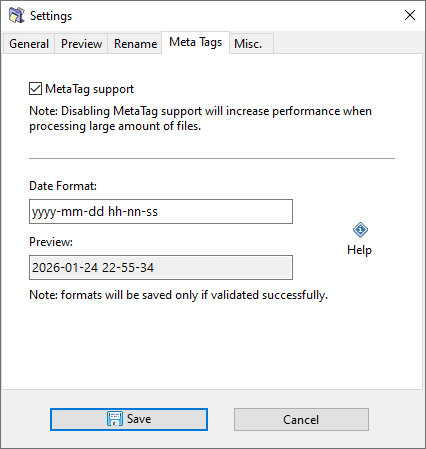
| Option |
Description |
| Meta tag support |
ExtractingEnable the processing of meta tags fromwhen filesthey are encountered.
Meta tag extraction can require significant system resources. IfDisabling youthis dooption not needcauses meta tags,tags disableto thisbe option.left in place unprocessed, which avoids that overhead entirely. |
| Date format |
TheSpecify specifiedthe format used when displaying date format will be used for formatting date &and time meta tags. See Date and Time format for available formatting options. |
| Preview |
TestsTest the specified date-date and time format using the current time. |
Miscellaneous settings
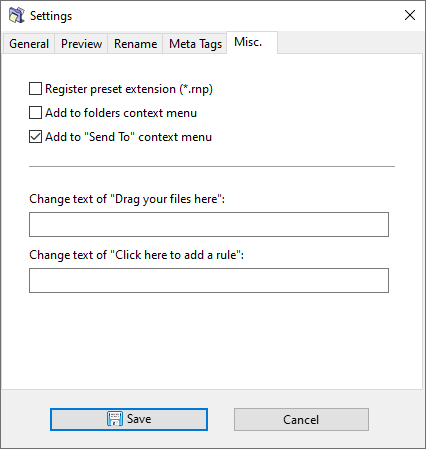
A general-purposeThis tab contains settings that do not belong to provideany allother miscellaneous settings.category.
| Option |
Description |
| Register preset extension (*.rnp) |
Associate the .rnp file extension with ReNamer. |
| Add to folders context menu |
in Windows Explorer,Add a ReNamer option is addedentry to the context menu for folders.folders in Windows Explorer. |
| Add to "Send To" context menu |
in Windows Explorer,Add a ReNamer option is addedentry to the Send To context menu.menu in Windows Explorer. |
| Change text of "Drag your files here" |
Customise the welcomeplaceholder label showndisplayed in the files table when it is empty. |
| Change text of "Click here to add a rule" |
Customise the welcomeplaceholder label showndisplayed in the rules table when it is empty. |
