ReNamer 7.10
ReNamer 7.10 has been released.
This update brings a long-requested dark theme, native meta tags for Android APK files, a more convenient Presets Manager, and a collection of reliability improvements around validation and metadata handling. Plus a lot of groundwork behind the scenes to make ReNamer properly cross-platform.
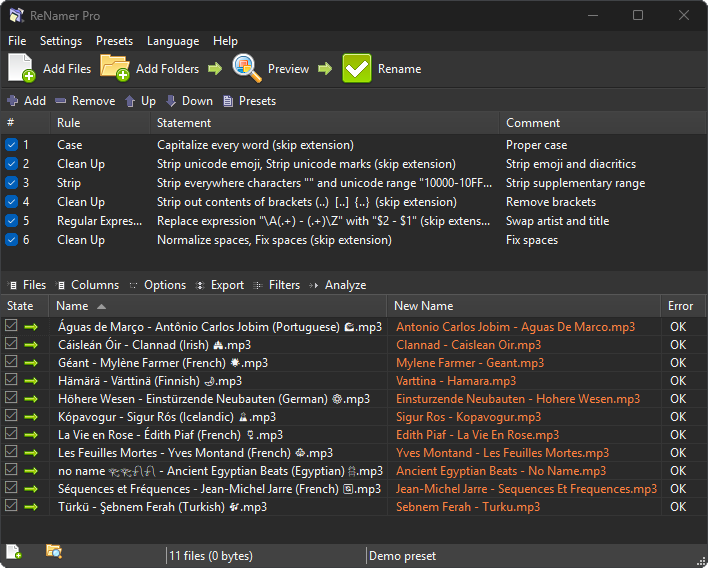
The standout new feature is dark theme support on Windows 10 and later. You can switch the appearance between Light and Dark modes. The Auto option follows the system preference, so ReNamer matches the rest of your desktop without extra configuration.
Another headline addition is a set of Android APK meta tags. APK files can now be renamed from their own package data: application label, version name and code, minimum/target/compile SDK versions, supported CPU architectures, and requested permissions. Handy if you keep a folder of APKs and want filenames that actually tell you what is inside them.
A significant part of this development cycle also went into making ReNamer properly cross-platform. Path handling, filename validation, natural sort order, Unicode classification, application data storage, environment variable expansion, application shortcuts, and reading of executable version info and audio metadata were all reworked to behave consistently across operating systems. This is the foundation for a native Linux build, which we will cover in a separate announcement once it is ready. In the meantime, Windows users benefit from the added consistency and reliability this groundwork brings.
Other changes:
Toolbar buttons to create application shortcuts that load a preset, or load a preset and rename in one step. The old dialog for creating shortcuts for every preset at once has been removed.
A toolbar button for the Presets Manager. The manager and the presets folder can now be opened even before any presets exist. Double-click the presets folder path to browse to it directly.
Added support for loading file lists from M3U8 playlists, in addition to M3U.
Significantly faster EXIF meta tag handling.
More accurate WMA duration and 64-bit object size handling.
More reliable filename clash detection on Windows, now matching how NTFS itself compares names. This fixes false clashes involving certain locale-specific characters (e.g. Turkish, German). Reserved Windows filenames (e.g. NUL, COM1, LPT1) are also detected during validation.
Text files without a byte-order mark are now read as UTF-8 by default.
Expanded the Pascal Script function library, including new functions for handling environment variables.
Empty paths are no longer added for renaming. Unrecognized leading command-line options are ignored instead of being treated as paths.
The “Add to ReNamer” folder context menu no longer enqueues the current working directory by mistake.
Updated the bundled User Manual and Quick Guide PDF files.
Updated language files: French, Russian, Turkish, Serbian, Bulgarian, Corsican.
General optimizations and cross-platform refinements throughout the application.
For more details see the full changelog between versions 7.9 and 7.10.