Main menu
TODO: Proof read, upload images, update links.
This article describes the options available in the main menu.
File menu
| Option |
Shortcut |
Description |
| New Project |
CTRL+Ctrl+N |
Create a new project.project, Clearclearing all rules and files. |
| Undo Renaming |
SHFT+CTRL+Shift+Ctrl+Z |
If possible, reversesReverse the effect of the last renaming operation.operation, if possible. |
| Paste Files |
SHFT+CTRL+Shift+Ctrl+V |
PastesPaste thea selection of files/files or folders from the clipboard into the Files pane. |
Add filesFiles |
F3 |
OpensOpen a window for selecting files from any folder and adding them to the Files pane. |
Add foldersFolders |
F4 |
OpensOpen a window for adding whole folders, according to the configured filter settings. |
| Preview |
F5 |
Generate new names by applying the current renaming rules. Not required if the auto preview option is enabled. |
| Rename |
F6 |
Rename all files to the names shown in the New Name (New Path) column in the Files pane. |
| Exit |
ALT+Alt+F4 |
Close the application. |
Settings menu
| Option |
Shortcut |
Description |
| All Settings |
F8 |
OpensOpen the Settings dialog. |
| General |
|
ShowsOpen the General tab of the Settings dialog. |
| Preview |
|
ShowsOpen the Preview tab of the Settings dialog. |
| Rename |
|
ShowsOpen the Rename tab of the Settings dialog. |
Meta tagsTags |
|
ShowsOpen the Meta Tags tab of the Settings dialog. |
| Miscellaneous |
|
ShowsOpen the Miscellaneous tab of the Settings dialog. |
| Filters |
CTRL+Ctrl+F |
ChangesOpen the Filter settings dialog, which controls the default behavior when adding folders, and allows specifying filtering based on file mask.
See the Filter settings article for more information.
|
Presets menu
SeePresets alsostore howa tonamed set of rules that can be quickly loaded and reused. For a full overview of working with presets, see useUsing presetsPresets.
| Option |
Shortcut |
Description |
| Load |
|
OpensOpen a submenu with a list oflisting all available presets. Click on a preset to load its rules ininto the Rules pane.pane, replacing the current set (any unsaved rules will be lost). If the preset was saved with any filter settings,settings, theythose will also be set.applied.
To Be aware that all currentappend rules willrather bethan lostreplace, ifhold notShift saved.while If you want to addloading a presetpreset, to the current rules stack, you canor use the Append presetPreset option in the Preset Manager.
|
Save As... |
CTRL+Shift+Ctrl+S |
SavesSave the current rules to the loaded preset. If no preset is currently loaded, prompts for a name. |
ManageSave As |
CTRL+MCtrl+S |
OpensSave the current rules as a new preset, always prompting for a name. |
Manage
Ctrl+M
Open the
Preset Manager dialog.
Browse...
BrowseOpen tothe folder where presets are stored
(viain Windows
Explorer).Explorer.
Import...
Select
presetspreset files from any location
in your file system to import (copy) them into ReNamer's
Presetspresets folder.
Create linksLinks
Create shortcut files (droplets) for each available preset. See the Create Links section below.
Rescan
Rescan the presets folder and repopulate the Load submenu. Useful after manually adding or removing preset files without restarting ReNamer.
Create Links
The followingCreate windowLinks popsoption up:opens
a 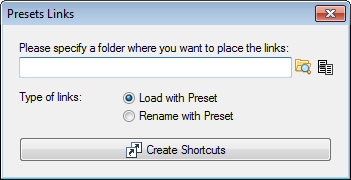
for Shortcutsgenerating (alsoshortcut files, known as "droplets")droplets, for each available preset.
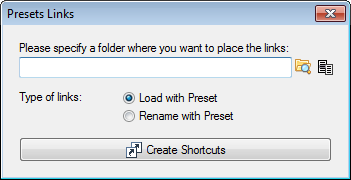
Shortcuts will be created for every available preset and placed in the specified folder. Two modes are available:
If the Load with Preset option is selected, links will— open a new ReNamer window with the preset loaded into the Rules pane and the files that where sent to the linkshortcut loaded into the Files pane. Now youYou can editthen rules, deletereview or add some more rules, and finally renameadjust the files.rules Ifbefore renaming. Any filter settings saved with the preset contained any filter settings, they will be applied to the incoming files.
Rename with Preset — load the preset and automatically rename all files
that where sent
viato the
link.shortcut, without opening the main window.
If
For more information, see the Command line article.
Warning: The Rename with Preset optionmode is selected, the linked preset will be loaded and allrenames files which were sent to the link will be automatically renamed.
For more information, please see Command line usage.
WARNING: Be careful with the Rename with Preset option. It will rename filesimmediately, without askingany forconfirmation yourprompt.
confirmation.
Rescan
Scans the preset folder for new presets. Useful if you have manually modified the content of the presets folder as you don't have to restart ReNamer to use them.
Help menu
| Option |
Shortcut |
Description |
Help (online)Online) |
F1 |
Open the online manual.documentation. |
| User Manual |
|
Opens "User Manual" file which is distributed withOpen the applicationUser (PDF format). |
History
Opens "History.txt"Manual file
which is distributed with the application.
The
History
Open the History.txt file
containsdistributed with the
listapplication, ofwhich lists changes
foracross the current and previousall versions.
About
Alt+F1
Shows a dialog that provides you withShow general information about
ReNamer,ReNamer and contact
detailsdetails. in case you are facing any difficulties that are not covered in this manual.
A right click onRight-clicking the
white header of the dialog
willcopies place ReNamer'sthe version information to the clipboard.
