
Log Viewer
The Log Viewer keeps a running record of all files hashed in the current session, along with their metadata and computed hash values. It is the primary way to review and export results after hashing a batch of files.
Open it via Log » View Log from the main menu or via the main toolbar.
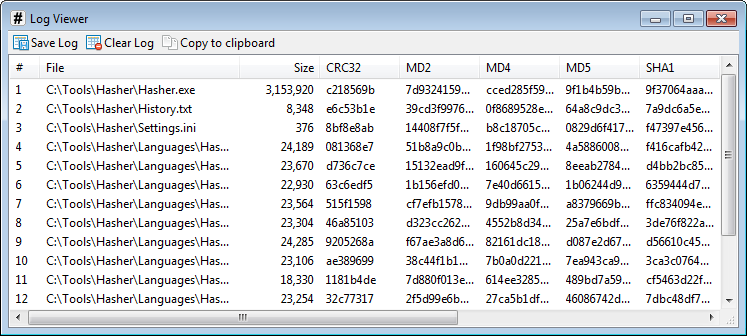
Each row corresponds to one hashed file, showing its path, size, and a column for each computed algorithm. The toolbar provides options to save the log to a file, copy it to the clipboard, or clear it. The same options are available via the Log menu in the main window.
The log is session-scoped and is not saved automatically. Entries are lost when the application is closed, so save or copy the log before exiting if you need to keep the results.
Saving the log
The Save Log dialog controls the format and content of the exported file.
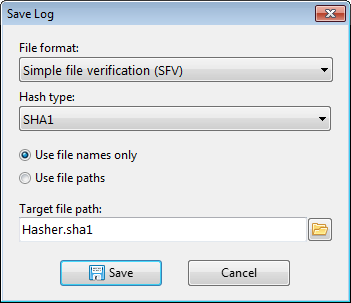
File format selects the output format:
- Simple file verification (SFV) — lists each file name followed by its hash value.
- Sum file (MD5SUM, SHA1SUM, etc.) — lists the hash value followed by the file name.
Both formats are widely supported by archive and verification utilities.
Hash type selects which algorithm's values to include in the output. Choose a specific algorithm, or select Auto to use the first available hash type for each file.
Path style controls how file references are written in the output:
- Use file names only — record only the file name, without any directory path.
- Use file paths — record the full file path as it appears in the log.
Target file path sets the destination file. Type a path directly or use the browse button to choose a location. When saving in sum file format, the file extension is suggested automatically to match the selected hash type (for example, .sha1 for SHA1).
Click Save to write the file.