
Files header menu
Right-click on the Files table header (columns) to see the context menu that allows you to enable/disable available columns.
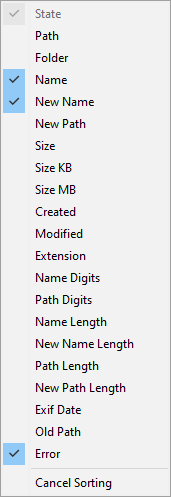
Click on any of the listed items to toggle them on or off. Once the desired columns become visible, you can rearrange them by dragging them around with the mouse.
The last option in the menu allows you to cancel the sorting, if you have previously clicked on of the columns to enable sorting.