
Meta Tags
There are two different ways for using the built-in meta tags:
- Using the Insert rule, the Replace rule, or the Rearrange rule to insert meta data directly into the filename,
- Using CalculateMetaTag function in the Pascal Script rule to perform more complex manipulations with the meta data.
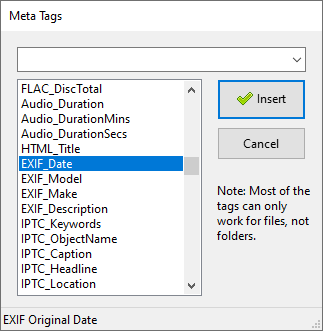
List of built-in Meta Tags
There are more than 100 built-in meta tags of various kinds:
- File information (size, dates, name, path, extension, and more).
- Audio tags (title, artist, album, genre, track number, duration, and more) in MP3, WMA, FLAC files.
- Photo tags (date, camera make and model, description, and more) in EXIF/IPTC/TIFF formats.
- Graphics properties (width and height, aspect ratio, number of pixels).
- Document summary information (title, subject, author, page count).
- File hashes (CRC32, MD5, SHA1, SHA256, SHA512).
- Email properties (date sent, subject, sender) for EML and MSG (Outlook) formats.
- Video properties (width and height, frames, duration, and more) for AVI format.
- Font properties (name, family, revision).
- Torrent file properties (name, hash, size, file count, and more).
- Android APK properties (label, version, package name, SDK versions, architectures, permissions).
- Automatically detected file extension using built-in Binary Signatures.
- File version information (product, company, version number, and more).
- Miscellaneous (HTML title, current date, clipboard contents).
Editing Meta Tags
ReNamer is a file renaming tool, not a meta tag editing tool. ReNamer does not edit meta tags and this feature will never be supported.
Extracting Meta Tags with 3rd party tools
There are 3rd party tools which let extract meta data from various file formats for which ReNamer does not have a built-in support. In such cases the output of these tools can be integrated and used within ReNamer with the help of the Pascal Script rule.
Sample scripts which demonstrate the use of this method can be found in the Pascal Script Library section.
Here is list of some 3rd party tools which can be used for extracting meta data: ExifTool, FFmpeg, Exiv2, MediaInfo.