
Randomize rule
This rule inserts randomly generated sequences of specified length and using a selection of characters (digits, letters, or a custom set).
Common practical uses include randomizing the order files and destroying existing filenames.
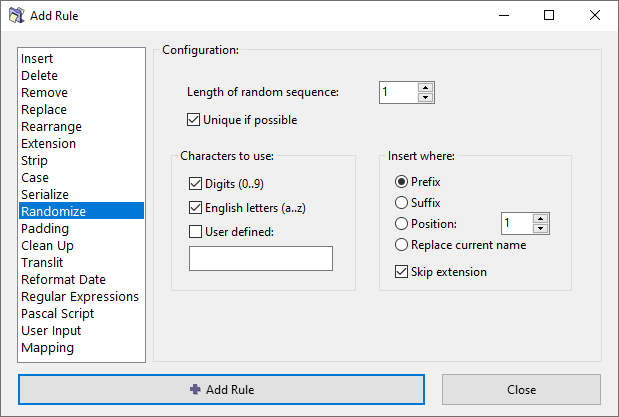
Options
Length of random sequence
Specify how many characters your random sequence should have.
For example, if you are using only digits and set length to 4, you will will get random numbers from 0000 to 9999, inclusive.
Unique if possible
Normally, randomly generated values can repeat themselves. If this option is enabled, ReNamer will attempt to generate unique values (without repetition) when possible.
Characters to use
The set of characters which will be used for generating random sequences.
You can choose between using digits (0..9), English letters (a..z), or specify your custom set of characters.
Insert where options
Specify where to insert the number. You have the following options:
- Prefix – Before the original filename.
- Suffix – After the original filename.
- Position – Insert the number at the specified position.
- Replace current name – Inserted number replaces the entire filename.
- Skip extension – Exclude file extension when calculating the position for insertion.