
Serialize rule
This rule allows you to index (serialize) a list of files by inserting numbers in increasing or decreasing order, using several different numbering systems, including Decimal digits, English letters, Roman numerals, Music notes, and more.
Example use cases:
- You have a bunch of log files, and you want to make them look like "log0001", "log0002", "log0003", etc.
- You want to force a specific sorting for your music collection: "01 - Song A", "02 - Song B", "03 - Song C", etc.
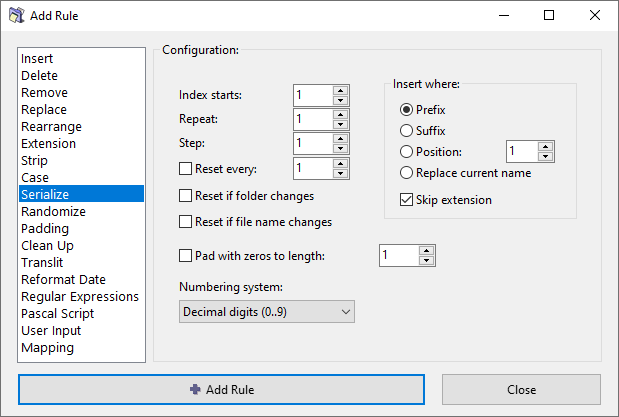
Indexing options
Index starts
Specify the starting number to be used for the first file.
For example, if the destination folder already has some files with serialized numbers, you can start with the next available number.
Repeat
How many times to repeat (reuse) the same index before incrementing it.
For example, if the repeat value is 2 and the index starts at 1, you will get these indexes 1, 1, 2, 2, 3, 3, and so on.
Step
Increment the index by this value after each processed file.
Usually the step is 1, but you may like to enter a higher number here if files with intermediate numbers are expected later. Also, negative numbers can be used to make decremental indexes, e.g. -1, -2, -3, etc.
Reset every
Reset index to the initial value after processing this many files.
Reset if folder changes
Reset index to the initial value if the folder path of the current file is different from the folder path of the previously processed file.
If you files are sorted by the folder path, you will get a fresh sequence of indexes used for each folder.
Reset if file name changes
Reset index to the initial value if the name of the current file is different from the name of the previously processed file.
Pad with zero to length
Pad the inserted number with leading zeros.
For example, index "123" becomes "000123" if it is padded to 6 digits, and "0123" if padded to 4 digits.
Insert where options
Specify where to insert the number. You have the following options:
- Prefix – Before the original filename.
- Suffix – After the original filename.
- Position – Insert the number at the specified position.
- Replace current name – Inserted number replaces the entire filename.
- Skip extension – Exclude file extension when calculating the position for insertion.
Numbering system
The choice of numbering system determines the symbols and enumeration techniques used for serialization.
The examples below illustrate each numbering system.
Decimal digits
Index starts at 0 with repeat 1 and step 1:
0, 1, 2, 3, 4, 5, 6, 7, 8, 9, 10, 11, 12, 13, …
English letters
Index starts at 1 with repeat 1 and step 1:
a, b, c, …, x, y, z, ba, bb, bc, …, bx, by, bz, ca, cb, cc, …, zx, zy, zz, baa, bab, bac, …
Index starts at 1 with repeat 1 and step 1, pad to length 3:
aaa, aab, aac, …, aax, aay, aaz, aba, abb, abc, …, abx, aby, abz, aca, acb, acc, …, azx, azy, azz, baa, bab, bac, …
Roman numerals
Index starts at 1 with repeat 1 and step 1:
I, II, III, IV, V, VI, VII, VIII, IX, X, XI, XII, …
Music notes
Index starts at 1 with repeat 1 and step 1:
C0, C#0, D0, D#0, E0, F0, F#0, G0, G#0, A0, A#0, B0, C1, C#1, …
Added in ReNamer 7.3.0.2 Beta.
Simplified Chinese
Index starts at 1 with repeat 1 and step 1:
一, 二, 三, 四, 五, 六, 七, 八, 九, 一十, 一十一, 一十二, 一十三, …
Custom alphabetic
Index starts at 1 with repeat 1 and step 1, using "ABC" symbols:
A, B, C, BA, BB, BC, CA, CB, CC, BAA, BAB, BAC, BBA, …
Index starts at 1 with repeat 1 and step 1, using "01" symbols:
0, 1, 10, 11, 100, 101, 110, 111, 1000, 1001, 1010, 1011, 1100, …
Custom numeric
Index starts at 0 with repeat 1 and step 1, using "ABC" symbols:
A, B, C, BA, BB, BC, CA, CB, CC, BAA, BAB, BAC, BBA, …
Index starts at 0 with repeat 1 and step 1, using "01" symbols:
0, 1, 10, 11, 100, 101, 110, 111, 1000, 1001, 1010, 1011, 1100, …