
Strip rule
This rule strips a list of characters from the filename. It offers predefined character sets, like digits, symbols and brackets, but you can also define your own character set. All occurrences of the specified characters will be removed from the filename.
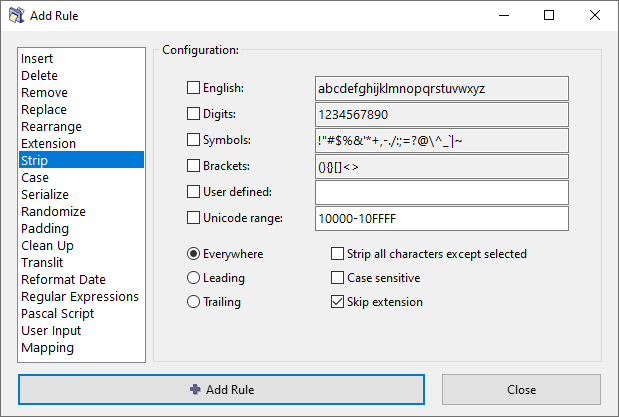
Character set options
English
Strip all English characters: "a" through "z".
Characters used in other languages, including those with diacritical marks, will not be stripped.
Digits
Strip all digits: "0" through "9".
Symbols
Strip common symbols: !"#$%&'*+,-./:;=?@^_`|~.
Brackets
Stip common brackets: (){}[]<>
The content between the brackets will remain unaffected. If you want to delete the content as well, use the Clean Up rule instead.
User defined
Specify any characters that need to be removed.
Unicode range
Strip Unicode codepoints by their hexadecimal codes.
You can specify a range of characters using the - (dash) between two codes.
Multiple codes and ranges can be separated using the , (comma) character.
For example:
10000-10FFFFfor supplementary planes,200B,200C,200D,FEFFfor zero width characters.
Positioning options
- Everywhere – The characters will be stripped no matter where they occur in the filename.
- Leading – Strip characters only at the beginning of the filename.
- Trailing – Strip characters only at the end of the filename.
General options
Strip all characters except selected
Invert the logic by keeping only the specified characters, and striping all other characters.
For example, if you want to strip all non-English characters, select this option along with the English character set option above.
Case sensitive
Match character case exactly when searching for characters to remove.
When enabled, "A" will not match "a". When disabled, uppercase and lowercase letters are treated as equivalent.
Skip extension
If checked, the file extension will be excluded from processing and will remain unaffected.